

Quick Start
Authentication Note: When you configure Vertex AI in Model Catalog with Service Account JSON (recommended), authentication is handled automatically. If you only configure with Project ID and Region, you’ll need to pass an OAuth2 access token with each request using the
Authorization header. See the Making Requests Without Model Catalog section for details.Add Provider in Model Catalog
1
Navigate to Model Catalog
Go to Model Catalog → Add Provider in your Portkey dashboard.
2
Select Vertex AI
Find and select Google Vertex AI from the provider list.
3
Configure Authentication
You’ll need your Here’s a guide on how to find your Vertex Project detailsIf you’re using Service Account File, refer to this guide.
Vertex Project ID and Vertex Region. You can authenticate using either:Option 1: Service Account JSON (Recommended for self-deployed models)- Upload your Google Cloud service account JSON file
- Specify the Vertex Region
- Required for custom endpoints (must have
aiplatform.endpoints.predictpermission)
- Enter your Vertex Project ID
- Enter your Vertex Region
- Simpler but may not support all features
Vertex Region accepts regional locations (e.g.
us-central1), multi-regional locations (us, eu), or global. Portkey automatically routes to the correct Google endpoint. See Supported Regions for details.4
Save and Use
Save your configuration. Your provider slug will be
@vertex-ai (or a custom name you specify).Self-Hosted GKE Deployments: When running the Portkey Gateway on GKE with Workload Identity Federation enabled (
GCP_AUTH_MODE=workload), the Gateway automatically acquires Vertex AI access tokens from the GCP metadata server. No manual Authorization header is needed.The GSA bound to the Gateway’s KSA must have the roles/aiplatform.user role. See the GCP deployment guide for setup.To use Anthropic models on Vertex AI, prepend
Example:
Example:
anthropic. to the model name.Example:
@vertex-ai/anthropic.claude-3-5-sonnet@20240620Similarly, for Meta models, prepend meta. to the model name.Example:
@vertex-ai/meta.llama-3-8b-8192Anthropic Beta Header Support: When using Anthropic models on Vertex AI, you can pass the
anthropic-beta header (or x-portkey-anthropic-beta) to enable beta features. This header is forwarded to the underlying Anthropic API.Google GenAI SDK (Gemini-only)
Route Google’s native GenAI SDK through Portkey by pointing it at the Portkey gateway and supplying the Portkey provider headers. The SDK handles the request shape; Portkey handles auth, observability, and governance.Python
<gateway-base-url> with your Portkey gateway URL, <api-key> with your Portkey API key, and <provider-id> with the Vertex AI provider slug from your Model Catalog.
Vertex AI Capabilities
Using the /messages Route with Vertex AI Models
Access Claude models on Vertex AI through Anthropic’s native/messages endpoint using Portkey’s SDK or Anthropic’s SDK.
This route only works with Claude models. For other models, use the standard OpenAI compliant endpoint.
- cURL
- Anthropic Python SDK
- Anthropic TypeScript SDK
Counting Tokens
Portkey supports the Google Vertex AI CountTokens API to estimate token usage before sending requests. Check out the count-tokens guide for more details.
Explicit context caching
Vertex AI supports context caching to reduce costs and latency for repeated prompts with large amounts of context. You can explicitly create a cache and then reference it in subsequent inference requests.Step 1: Create a context cache
Use the Vertex AIcachedContents endpoint through Portkey to create a cache:
cURL
Context caching requires a minimum of 1024 tokens in the cached content. The cache has a default TTL (time-to-live) which you can configure using the
ttl parameter.Step 2: Use the cache in inference requests
Once the cache is created, reference it in your chat completion requests using thecached_content parameter:
- cURL
- Python SDK
- NodeJS SDK
Using Self-Deployed Models on Vertex AI (Hugging Face, Custom Models)
Portkey supports connecting to self-deployed models on Vertex AI, including models from Hugging Face or any custom models you’ve deployed to a Vertex AI endpoint. Requirements for Self-Deployed Models To use self-deployed models on Vertex AI through Portkey:-
Model Naming Convention: When making requests to your self-deployed model, you must prefix the model name with
endpoints. -
Required Permissions: The Google Cloud service account used in your Portkey Model Catalog must have the
aiplatform.endpoints.predictpermission.
- NodeJS SDK
- Python SDK
Why the prefix? Vertex AI’s product offering for self-deployed models is called “Endpoints.” This naming convention indicates to Portkey that it should route requests to your custom endpoint rather than a standard Vertex AI model.This approach works for all models you can self-deploy on Vertex AI Model Garden, including Hugging Face models and your own custom models.
Document, Video, Audio Processing
Vertex AI supports attaching various file types to your Gemini messages including documents (pdf), images (jpg, png), videos (webm, mp4), and audio files.
Supported Audio Formats:
mp3, wav, opus, flac, pcm, aac, m4a, mpeg, mpga, mp4, webmGemini Docs:Document Processing (PDF)
Gemini’s vision capabilities excel at understanding the content of PDF documents, including text, tables, and images.Gemini Documents Understanding Docs
While you can send other document types like
.txt or .html, they will be treated as plain text. Gemini’s native document vision capabilities are optimized for the application/pdf MIME type.Media Resolution
Themedia_resolution parameter allows you to control token allocation for media inputs (images, videos, PDFs) when using Gemini models on Vertex AI. This helps balance between processing detail and cost/speed.
Supported values
Top-level configuration
Apply media resolution globally to all media in the request:Per-part configuration (Gemini 3 only)
For Gemini 3 models, you can specify media resolution on individual media parts. Per-part settings take precedence over global settings when both are specified.Google Vertex AI Media Resolution Documentation
Extended Thinking (Reasoning Models) (Beta)
The assistants thinking response is returned in the
response_chunk.choices[0].delta.content_blocks array, not the response.choices[0].message.content string.Gemini models do not support plugging back the reasoning into multi turn conversations, so you don’t need to send the thinking message back to the model.google.gemini-2.5-flash-preview-04-17 anthropic.claude-3-7-sonnet@20250219 support extended thinking.
This is similar to openai thinking, but you get the model’s reasoning as it processes the request as well.
Note that you will have to set strict_open_ai_compliance=False in the headers to use this feature.
Single turn conversation
To disable thinking for gemini models like
google.gemini-2.5-flash-preview-04-17, you are required to explicitly set budget_tokens to 0.Using reasoning_effort parameter
Use the OpenAI-compatiblereasoning_effort parameter as an alternative to thinking.budget_tokens:
Gemini 2.5 models
reasoning_effort maps to thinking_budget with specific token allocations:
Gemini 3.0+ models
reasoning_effort maps directly to thinkingLevel:
Multi turn conversation
Sending base64 Image
Here, you can send the base64 image data along with the url field too:
This same message format also works for all other media types — just send your media file in the
url field, like "url": "gs://cloud-samples-data/video/animals.mp4" for google cloud urls and "url":"https://download.samplelib.com/mp3/sample-3s.mp3" for public urlsYour URL should have the file extension, this is used for inferring MIME_TYPE which is a required parameter for prompting Gemini models with filesText Embedding Models
You can use any of Vertex AI’sEnglish and Multilingual models through Portkey, in the familar OpenAI-schema.
The Gemini-specific parameter
task_type is also supported on Portkey.- NodeJS
- Python
- cURL
Function Calling
Portkey supports function calling mode on Google’s Gemini Models. Explore this Cookbook for a deep dive and examples:Managing Vertex AI Prompts
You can manage all prompts to Google Gemini in the Prompt Library. All the models in the model garden are supported and you can easily start testing different prompts. Once you’re ready with your prompt, you can use theportkey.prompts.completions.create interface to use the prompt in your application.
Image Generation Models
Portkey supports theImagen API on Vertex AI for image generations, letting you easily make requests in the familar OpenAI-compliant schema.
List of Supported Imagen Models
imagen-3.0-generate-001imagen-3.0-fast-generate-001imagegeneration@006imagegeneration@005imagegeneration@002
Video Generation (Veo)
Portkey supports Veo on Vertex AI for video generation from text or image prompts. Veo uses a two-step long-running flow: you first submit a generation request and receive an operation name, then poll until the operation completes and the video is ready.How Veo Differs From Other Video APIs
Unlike single-call video APIs (for example, OpenAI’s Sora API, where you create a job and then check status or download separately), Vertex AI’s Veo video API is explicitly built as a long-running operation:- Step 1 – Start generation: Send a
predictLongRunningrequest with your prompt (and optional image/video inputs). The API returns immediately with an operation name (no video yet). - Step 2 – Poll until done: Call
fetchPredictOperationwith that operation name repeatedly (e.g., every 30–60 seconds) untildoneistrue. The final response contains the generated video(s), either as URIs (if you setstorageUri) or as base64-encoded bytes.
Implementation: Request Then Poll
Use two scripts (or two phases in one app):- Request script – Calls
predictLongRunningwith your prompt and parameters, then writes the returned operation name (and related data) to a file such asveo_operation.json. - Poll script – Reads that file, calls
fetchPredictOperationin a loop until the operation is done, then saves the first generated video (e.g., to./videos/dialogue_example.mp4).
- Node.js
- Python
1. Request script (2. Poll script (Run:
veo_request.js) – The script sends your text prompt and options (duration, resolution, etc.) to Veo’s predictLongRunning endpoint. The API starts the job on Google’s side and returns right away with an operation ID. The script writes that ID plus project/location/model info to veo_operation.json so the poll script can use it.veo_poll.js) – This script reads veo_operation.json, then calls fetchPredictOperation in a loop with the saved operation name. Each call returns the current job status; when done is true, the response includes the generated video(s). The script then decodes the first video from base64 and writes it to ./videos/dialogue_example.mp4.node veo_request.js, then node veo_poll.js.Ensure
PORTKEY_API_KEY is set (and, for Python, optionally VERTEX_PROJECT_ID). Configure Vertex AI and project access in the Portkey dashboard or via the client so the gateway can call the Vertex Veo API.Custom Metadata Labels
Vertex AI supports adding custom labels to your API calls for attribution. Pass labels in your request body or configure them in your gateway config usingoverride_params. Label support is available across chat/completions, embeddings, batches, and fine-tuning endpoints.
- Python
- NodeJS
- Config
Mapping Portkey metadata to Vertex labels
Any Portkey metadata attached to a request is automatically mapped to Vertex resource labels. Keys are sanitized to match Google Cloud label requirements (onlya-z, A-Z, 0-9, _, - are allowed — invalid characters are replaced with _) and each key is prefixed to avoid collisions with labels you pass directly.
- Default prefix:
pk_gateway_(for example,_userbecomespk_gateway__user). - Self-hosted override: set the
METADATA_MAP_KEY_PREFIXenvironment variable on the Gateway to customize the prefix. - Labels passed directly in the request (or via
override_params.labels) are not sanitized or prefixed — the onus is on the caller.
Grounding with Google Search
Vertex AI supports grounding with Google Search. This is a feature that allows you to ground your LLM responses with real-time search results. Grounding is invoked by passing thegoogle_search tool (for newer models like gemini-2.0-flash-001), and google_search_retrieval (for older models like gemini-1.5-flash) in the tools array.
Grounding with Google Maps
Vertex AI supports grounding with Google Maps for location-based queries — places, directions, ratings, and geographic information. Pass thegoogle_maps tool in the tools array:
With retrieval configuration
Optionally pass location coordinates, language, and widget options inside the functionparameters:
Grounding with Enterprise Web Search
Vertex AI supports enterprise web search grounding for organizations with Vertex AI Search configured. Pass theenterpriseWebSearch (or enterprise_web_search) tool in the tools array:
gemini-2.0-flash-thinking-exp and other thinking/reasoning models
gemini-2.0-flash-thinking-exp models return a Chain of Thought response along with the actual inference text,
this is not openai compatible, however, Portkey supports this by adding a \r\n\r\n and appending the two responses together.
You can split the response along this pattern to get the Chain of Thought response and the actual inference text.
If you require the Chain of Thought response along with the actual inference text, pass the strict open ai compliance flag as false in the request.
If you want to get the inference text only, pass the strict open ai compliance flag as true in the request.
Multiple Modalities on chat completions endpoint
gemini-2.5-flash-image (nano banana)
The image data is available in thecontent_parts field in the response and it can be plugged back in for multi turn conversations
single turn conversation
Thought Signatures (Tool Calling Verification)
Set
x-portkey-strict-open-ai-compliance to false to receive the thought_signature in the response. This header must be included in all requests when using thought signatures.thought_signature parameter in tool calling conversations for verifying the payload. This signature is returned by the model in the assistant’s tool call response and must be included when continuing multi-turn conversations.
Google Gemini Thought Signatures Documentation
Single turn conversation
In a single-turn conversation, you make a request with tools defined, and the model returns tool calls with thought signatures.Multi turn conversation
In multi-turn conversations, you must include thethought_signature field in the assistant’s tool call when continuing the conversation.
The
thought_signature is automatically generated by the model and returned in the tool call response. You must preserve this signature when including the assistant’s message in subsequent requests.Computer Use (Browser Automation) (Preview)
This uses the Gemini computer-use preview model. Set
strict_open_ai_compliance to false.Single turn conversation
Multi turn conversation
multi turn conversation
Safety settings
Gemini models support configuring safety settings to control how potentially harmful content is handled. Passsafety_settings as an array with category and threshold values:
safetyRatings in each choice object. Set strict-open-ai-compliance to false to receive safetyRatings in the response.
Making Requests Without Portkey’s Model Catalog
You can also pass your Vertex AI details & secrets directly without using the Portkey’s Model Catalog. Vertex AI expects aregion, a project ID and the access token in the request for a successful completion request. This is how you can specify these fields directly in your requests:
Example Request
- NodeJS SDK
- Python SDK
- OpenAI Node SDK
- cURL
How to Find Your Google Vertex Project Details
To obtain your Vertex Project ID and Region, navigate to Google Vertex Dashboard.- You can copy the Project ID located at the top left corner of your screen.
- Find the Region dropdown on the same page to get your Vertex Region.
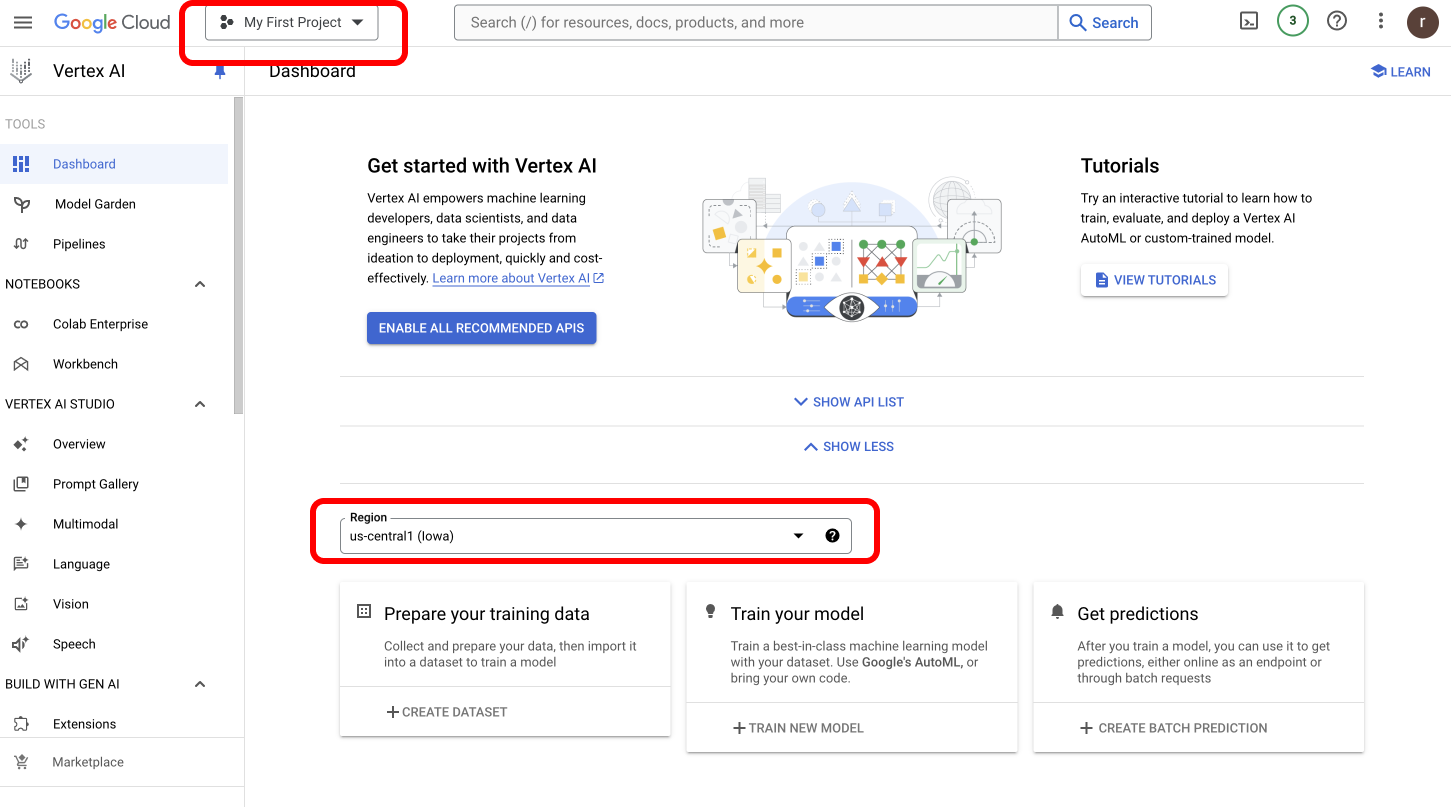
Supported Regions
Portkey supports every Vertex AI location type. The Gateway inspects the configured Vertex Region and routes the request to the matching Google endpoint automatically — you only need to set the region, no extra configuration required.
When to use which:
- Regional (e.g.
us-central1) — pin requests to a specific Google region. Use this when you have data residency requirements or want to colocate with other GCP workloads. - Multi-regional (
us,eu) — spreads serving across regions within a continent for higher availability and quota, while keeping data within that geography. - Global (
global) — broadest model availability and capacity, no geographic pinning. Use when latency tolerance is high and residency isn’t a constraint.
The model and region used in an inference request must match the region where the model (or cache, or fine-tune) was created. Refer to Vertex AI generative AI locations for the full list of regions and which models are available in each.
Get Your Service Account JSON
- Follow this process to get your Service Account JSON.
- Upload your Google Cloud service account JSON file
- Specify the Vertex Region
aiplatform.endpoints.predict permission to access custom endpoints.
Learn more about permission on your Vertex IAM key here.
For Self-Deployed Models: Your service account must have the
aiplatform.endpoints.predict permission in Google Cloud IAM. Without this specific permission, requests to custom endpoints will fail.Using Project ID and Region Authentication
For standard Vertex AI models, you can simply provide:- Your Vertex Project ID (found in your Google Cloud console)
- The Vertex Region where your models are deployed
Workload Identity Federation Authentication
For environments where Portkey runs on Google Cloud infrastructure (e.g., GKE), you can use Workload Identity Federation to authenticate without managing service account keys. This method uses the attached service account identity of the workload environment. To use this method, configure your integration with:- Set the auth type to Workload Identity Federation
- Provide your Vertex Project ID
Cross-Cloud Workload Identity Federation (AWS to GCP)
For deployments where the Portkey Gateway runs on AWS infrastructure (e.g., EKS) but needs to access Vertex AI on GCP, you can use cross-cloud Workload Identity Federation. The Gateway’s AWS IAM role authenticates directly with GCP via AWS STSGetCallerIdentity, eliminating the need to manage GCP service account keys.
Use an AWS IAM provider on the Workload Identity Pool — not an OIDC provider.
1
Grant the Gateway IAM role required AWS permissions
Attach the following policy to the AWS IAM role assumed by the Gateway pod/task. This allows the Gateway to call AWS STS to generate the signed identity token used during federation.
2
Set environment variables
Define values used across the setup commands.
3
Create a Workload Identity Pool and AWS provider
4
Map attributes and restrict to the Gateway's IAM role
5
Retrieve the WIF audience
Save this value — it’s used in the Gateway config.
6
Grant Vertex AI access
Choose one of the following:Option A — Direct access (federated identity gets Option B — Service Account Impersonation (federated identity impersonates a GSA)
roles/aiplatform.user directly)7
Configure the Gateway
Update your Gateway
values.yaml with the WIF settings and redeploy.Next Steps
SDK Reference
Complete SDK documentation and API reference
Add Metadata
Add metadata to your Vertex AI requests
Gateway Configs
Configure advanced gateway features
Request Tracing
Trace and monitor your Vertex AI requests
Setup Fallbacks
Create fallback configurations between providers
Portkey is now PRISMA AIRS AI Gateway. See it in action.
Contact Us