

When to Use
Use client credentials when:- The MCP server sits behind your own IdP (Keycloak, Microsoft Entra ID, Amazon Cognito, and similar) and accepts service tokens
- Access is to shared resources (knowledge bases, internal APIs, analytics) rather than personal data
- No user should be prompted to sign in to the MCP server
Agents still authenticate to Portkey separately, with an API key or another gateway auth method. Client credentials only covers the second hop, Portkey to the MCP server.
Prerequisites
Set these up at your IdP first:- A confidential client that can use the client credentials grant, with a client ID and client secret
- A scope the client may request (most IdPs require one). Portkey sends only the scope you configure
- The token endpoint URL. It must use HTTPS and be reachable from the gateway
- An MCP server that accepts access tokens from this IdP
access_token and expires_in. If this call fails, Portkey’s request fails the same way.
Where to find the token endpoint
For Okta, create an API Services app, add a custom scope to the authorization server, and add an access policy rule that allows the Client Credentials grant for that app.
Not every IdP and plan offers the client credentials grant. Okta, for example, offers it only to orgs with an NHI Authentication Token subscription purchased or renewed on or after August 14, 2026. If the token request fails with a message about a missing entitlement, check your IdP plan before debugging Portkey.
Configure in the UI
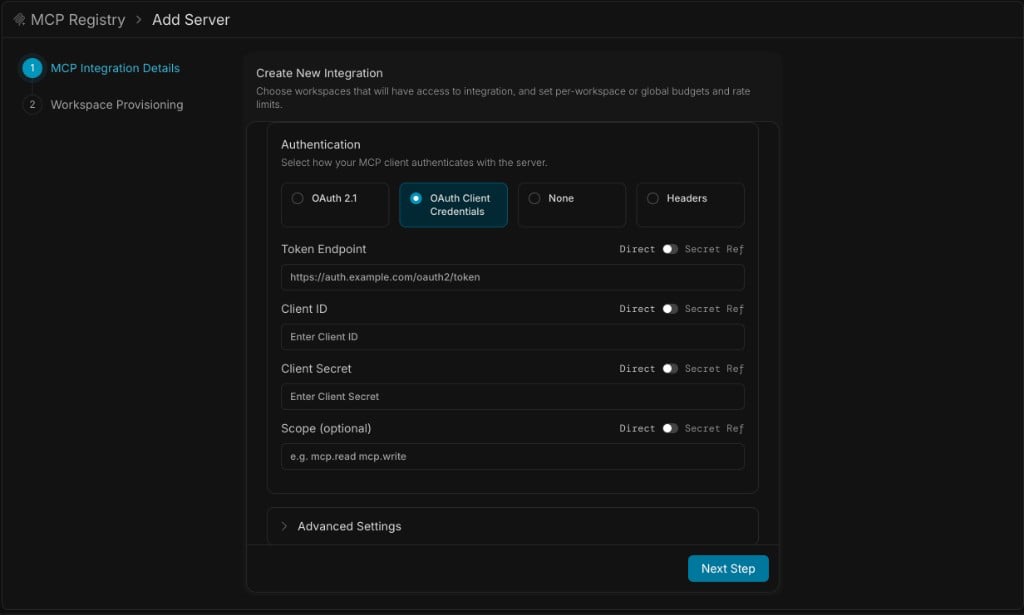
1
Add the server
Go to MCP Registry and click Add Server. Enter the server’s name, URL, and transport.
2
Select the auth type
Under Authentication, choose OAuth Client Credentials.
3
Enter the credentials
4
Provision and create
Click Next Step, choose the workspaces that get access, and create the server.
Store credentials in a secret reference
Each field has a Direct / Secret Ref toggle. Switch a field to Secret Ref to read its value from your vault instead of storing it in Portkey. Store the client secret there at minimum. See Secret References to connect a vault.Configure with the API
Create the integration withauth_type set to oauth_client_credentials and the credentials under configurations.oauth_client_credentials:
Configuration fields
All fields live underconfigurations.oauth_client_credentials.
Reference the secret from a vault
Map the secret withsecret_mappings instead of sending client_secret:
How It Works
Token requests. Portkey sends aPOST to the token endpoint with grant_type=client_credentials, plus scope when configured. The client ID and secret are sent with HTTP Basic authentication.
Caching. Portkey keeps one token per server per workspace and shares it across all users and gateway instances. It doesn’t request a new token for every call.
Refresh. A token is replaced shortly before it expires, up to 60 seconds early (less for very short-lived tokens). If the IdP doesn’t return expires_in, Portkey assumes one hour. If the MCP server answers 401, Portkey requests a new token and retries once.
Config changes. Changing the credentials, scope, or endpoint takes effect without a restart, and Portkey requests a new token with the new values. See Configuration changes aren’t taking effect if a change seems stuck.
What Portkey sends where
Static, forwarded, and identity headers never reach the IdP.
Security
- HTTPS only. Token endpoints that don’t use HTTPS are rejected, since the secret is sent with every token request.
- No private addresses. Token endpoints that resolve to private or reserved network addresses are blocked. On self-hosted and hybrid gateways, allow an internal IdP by adding its host to
TRUSTED_CUSTOM_HOSTS. See Custom Hosts. - No silent fallback. If the client ID or a valid token endpoint is missing, requests to the server fail. Portkey doesn’t fall back to static headers.
- Credential isolation. Agents see only their Portkey credentials, never the client secret or access token.
- Shared identity. Every user of the server acts as the same service identity at the MCP server. Don’t use it for per-user permissions or attribution. Use OAuth 2.1 for those.
Rotate the Secret
- Create a new secret for the client at your IdP. Keep the old one active
- Update Client Secret in the integration (or the vault entry it references)
- Wait for the change to propagate, then confirm requests to the MCP server succeed
- Revoke the old secret
Limitations
Portkey sends onlygrant_type and scope on the token request.
- No extra token parameters. IdPs that require one, such as an
audienceorresourceparameter, aren’t supported yet. Auth0, for example, typically expects an audience - Client secret authentication only.
private_key_jwtand mutual TLS aren’t supported - Scopes come from configuration. A scope named in the MCP server’s
WWW-Authenticatechallenge doesn’t change the request - One identity per server. The same credentials apply to every user and workspace that uses the integration
Troubleshooting
The MCP client usually shows only a generic connection error. Look for the cause in your IdP’s logs, where a failed token request appears.Related
Portkey is now PRISMA AIRS AI Gateway. See it in action.
Contact Us